
In most cases, this issue is caused by permalink or rewrite rule conflicts, especially after:
- Migrating a site
- Updating WordPress or Divi
- Installing or removing plugins
- Switching hosting environments
Quick Fix: Re-save Permalinks (Works in Most Cases)
This is the fastest and safest solution.
Step 1: Go to Permalink Settings
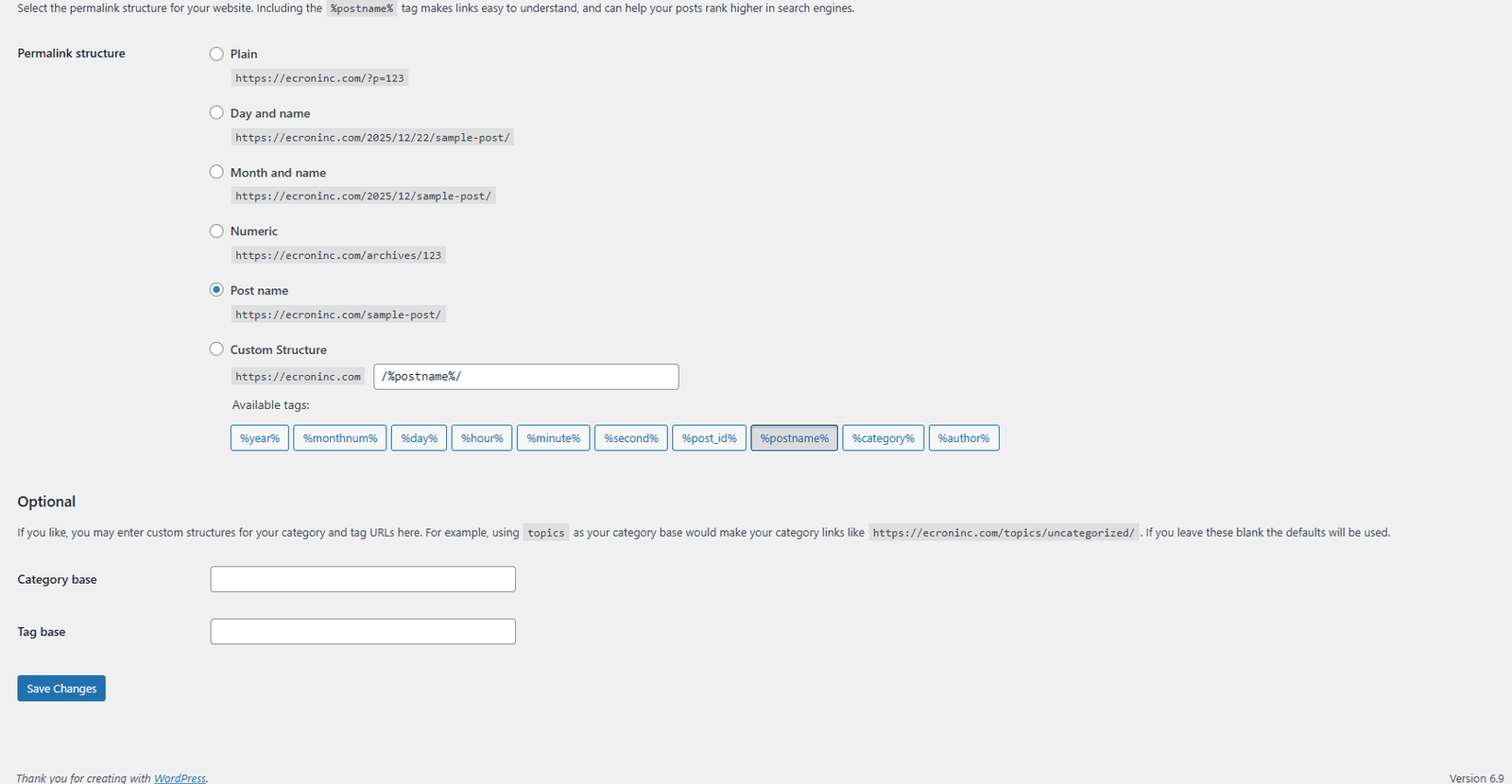
- Navigate to WordPress Dashboard → Settings → Permalinks
Step 2: Re-save Permalinks
- Do not change anything.
- Simply click the Save Changes button.
This refreshes WordPress rewrite rules and fixes internal routing issues.
Step 3: Check Divi Library Again
- Open the Divi Builder.
- Try inserting a saved layout.
Your missing Divi Library layouts should now appear correctly.
Why This Fix Works
Divi relies on WordPress rewrite rules to fetch and display saved layouts. When these rules become outdated or corrupted, Divi Library items may fail to load—even though they still exist in the database. Re-saving permalinks forces WordPress to regenerate those rules, instantly resolving the issue.
Conclusion:
The missing Divi Library layouts issue is common but easy to fix. By properly saving layouts and refreshing your permalinks, you can quickly restore access to your saved designs. This simple step resolves most cases without any technical changes. Keeping WordPress and Divi updated also helps prevent the issue. With these steps, your Divi workflow stays smooth and uninterrupted.Search blogs
Other Blogs

Fixing Stripe API Errors in Forminator: How the Forminator Stripe App Solves Connection Issues
If your Stripe payments are failing or Forminator is showing API connection errors, the issue is usually caused by missing or invalid Stripe permissions. This happens when Stripe API keys are not properly linked or have been restricted by Stripe for security reasons....
How to Fully Secure Your WordPress Website Using Defender Pro
Securing a WordPress website requires more than just installing a security plugin—it depends on configuring the right features correctly. Defender Pro provides a comprehensive set of tools designed to protect your site from hackers, malware, and unauthorized access when used effectively.
How to Fix WordPress Not Sending Emails Problem
One of the most frustrating issues for WordPress users is when the website suddenly stops sending emails. Whether it’s contact form messages, password reset links, or WooCommerce order notifications — these emails are essential for smooth communication and user trust....
10 Common WordPress Issues and How to Fix Them
WordPress is a powerful and flexible platform, but it can occasionally present technical challenges that disrupt your website’s performance or functionality. From plugin conflicts and slow loading speeds to security issues, broken links, and failed updates, these problems are common for many site owners. This guide highlights the most frequent WordPress issues and provides practical, easy-to-follow solutions to resolve them quickly. Whether you’re troubleshooting errors, improving performance, or strengthening security, understanding these fixes can help keep your WordPress site running smoothly and reliably.
How to Improve Divi Website Speed with Caching and Lazy Loading
If you’re using the Divi theme for WordPress, you already know it’s one of the most powerful and flexible page builders available. But with its wide range of features comes the risk of slower page load times—especially if your site isn't properly optimized. Two of the...